
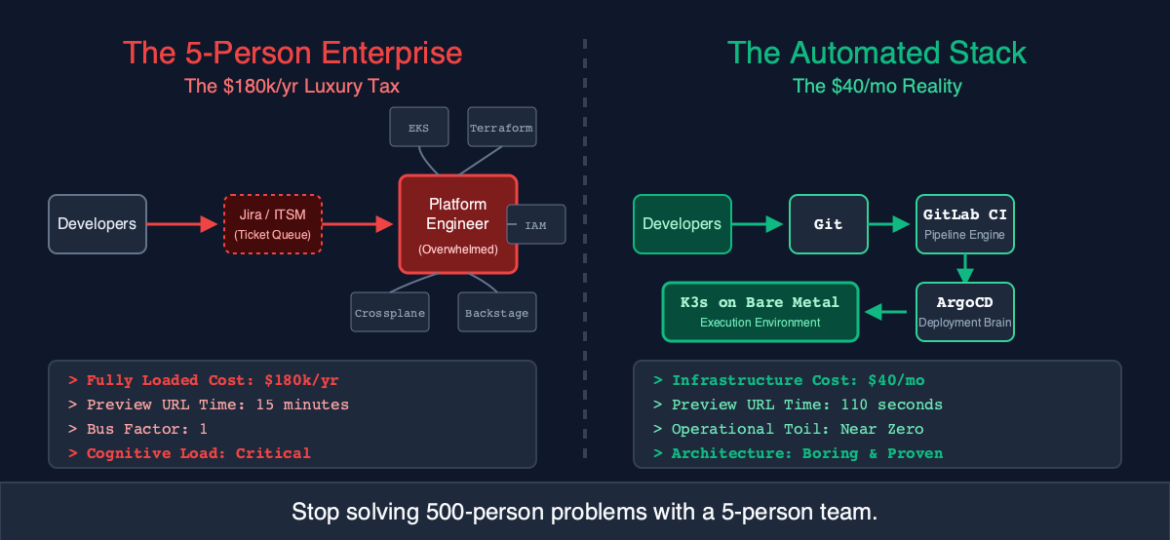
Part 1: The “Platform Gap”
Why do small teams need a platform?
Because without one, you are stuck in TicketOps.
- Dev: “Hey, I need a database for the new search feature.”
- Ops: “Okay, creating a ticket. I’ll Terraform it next week.”
- Dev: “Also, the staging environment is broken again.”
- Ops: “Yeah, I’m debugging the Nginx config. Don’t deploy until Thursday.”
This friction kills startups. The “Platform Gap” is the distance between a developer writing code and that code running in a live URL.
In big companies, the Platform Team builds a “Golden Path”—a self-service portal where devs click a button and get a database. In small companies, the “Golden Path” is usually a frantic Slack message to the CTO.
We need to close the gap. But we can’t afford the team. So we buy the stack.
Part 2: The Stack (The “Agency Build Farm”)
We call this architecture the “Agency Build Farm” because it was perfected by high-velocity dev agencies who ship 20 projects a year. They don’t have time to fiddle with AWS IAM roles for every client. They need a machine that turns code into deployments.
Here are the three pillars:
1. The Engine: K3s on Bare Metal
Stop trying to manage EKS (Elastic Kubernetes Service) for a small team. EKS is fantastic for massive scale, but it requires a dedicated engineer just to manage the VPCs, Subnets, and IAM policies.
K3s is Kubernetes stripped of the bloat. It is a single binary. It installs in 30 seconds.
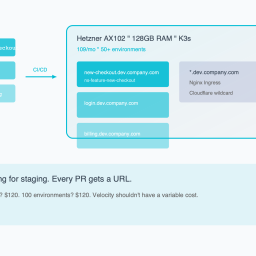
By running it on a Hetzner Bare Metal server (e.g., AX102), you get raw power without the complexity tax.
2. The brain: GitLab CI (or GitHub Actions)
This is your orchestrator. It listens for git pushes. It runs tests. It builds Docker images. But crucially, it does not touch the production server.
*Wait, what?*
In the old “Push-Based” model, CI would run `kubectl apply`. This meant you had to give your CI server root access to your cluster. This is a security nightmare and a recipe for “config drift” (where the live server looks different than the git repo).
3. The Hands: ArgoCD (GitOps)
This is the secret weapon. ArgoCD lives inside your cluster. It watches a git repository. When it sees a change in the YAML files, it pulls them down and applies them.
- Dev: Commits a change to `deployment.yaml`.
- ArgoCD: “I see a change. Syncing.”
ArgoCD is your “Platform Engineer.” It works 24/7. It never forgets to apply a config map. It never accidentally deletes the wrong namespace. It ensures that Git is the Source of Truth.
Part 3: The “Golden Path” Workflow
Let’s walk through the day in the life of a developer on this stack.
Scenario: A developer needs to add a Redis cache to their service.
The Old Way (TicketOps):
1. Ask Ops for Redis.
2. Wait 3 days.
3. Get connection string.
4. Realize the firewall ports are blocked.
5. Wait 1 day.
The “Platform Stack” Way:
1. Developer opens `helm/values.yaml` in their repo.
2. Adds:
    redis:
      enabled: true
3. Git Commit & Push.
What happens automatically:
1. GitLab CI validates the YAML syntax.
2. ArgoCD detects the change in the Helm chart configuration.
3. ArgoCD talks to the K3s API: “Spin up a Redis pod in this namespace.”
4. K3s provisions the pod and creates the internal DNS service.
Total time: 5 minutes.
Human intervention: Zero.
This is the definition of Platform Engineering: Self-Service Infrastructure.
Part 4: Implementation Guide (Set this up in 4 hours)
You don’t need a year-long roadmap. You can build this on a Friday afternoon.
Step 1: The Hardware ($60/mo)
Rent a Hetzner AX52 (AMD Ryzen 7, 64GB RAM).
Install Ubuntu 24.04.
Step 2: The Cluster (10 minutes)
SSH into the server and run:
curl -sfL https://get.k3s.io | sh -Copy the `/etc/rancher/k3s/k3s.yaml` to your local machine. You now have a cluster.
Step 3: The Platform (ArgoCD)
Install ArgoCD (the robot operator):
kubectl create namespace argocd
kubectl apply -n argocd -f https://raw.githubusercontent.com/argoproj/argo-cd/stable/manifests/install.yaml
Step 4: The Connectivity (Cloudflared)
“But Sarah, how do I expose this securely without messing with firewalls?”
Use a Cloudflare Tunnel. It creates a secure outbound connection from your cluster to the internet. No open ports. No public IP management.
Deploy the `cloudflared` container in your cluster. Point `argocd.yourcompany.com` to it.
Now you have a secure, HTTPS-protected Platform Portal.
Part 5: The Economics of “Democratization”
Let’s look at the ROI of this stack versus the “Hire a Guy” model.
Option A: Hire a Platform Engineer
- Salary: $160,000
- Recruiting Fee: $30,000
- Onboarding: 3 months
- Total Year 1 Cost: ~$220,000
Option B: The “Agency Build Farm” Stack
- Hetzner Server: $720/year
- ArgoCD: Free (Open Source)
- GitLab: Free (Tier)
- Consultant to set it up (One-time): $5,000 (or do it yourself with this guide)
- Total Year 1 Cost: ~$6,000
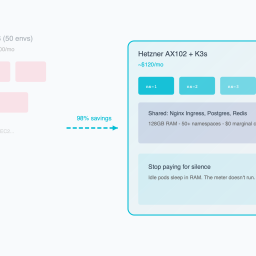
Savings: $214,000.
But the real value isn’t the money saved. It’s the velocity gained.
When a team of 5 has the tools of a team of 50, they stop fighting infrastructure and start shipping product. They deploy 10 times a day instead of once a week. They fix bugs in minutes.
Conclusion: Complexity is a Choice
The biggest lie sold to small teams is that “simple is bad.” That if you aren’t using a multi-region, active-active, service-mesh-enabled AWS architecture, you aren’t “serious.”
Complexity is not a badge of honor. It is a tax on your velocity.
Platform Engineering, at its core, is about reducing cognitive load. It is about letting your developers write code without needing to understand how a VPC peering connection works.
You can achieve this with a team of 20 engineers building custom tools.
Or you can achieve it with a single $60 server and three open-source tools that were designed to work together.
You don’t need a Platform Team. You just need a Platform.
*Ready to deploy your own Platform Stack? We’ve open-sourced our “Agency Build Farm” Terraform & Helm templates. It includes the K3s config, ArgoCD setup, and a sample “Golden Path” application. Clone it here.*
Ready to see your savings? Our Cloud Exit Calculator compares AWS vs Hetzner in 30 seconds. Or get an Infrastructure Audit ($495) for a migration blueprint.
Reclaim your proprietary data. Deploy Private AI.
Stop sending your proprietary IP to external APIs and managed SaaS. We deploy high-throughput inference and stateful agents directly onto your own Bare-Metal or VPC infrastructure. Execute AI workloads with zero API taxes, zero hyperscaler lock-in, and absolute control over your data.